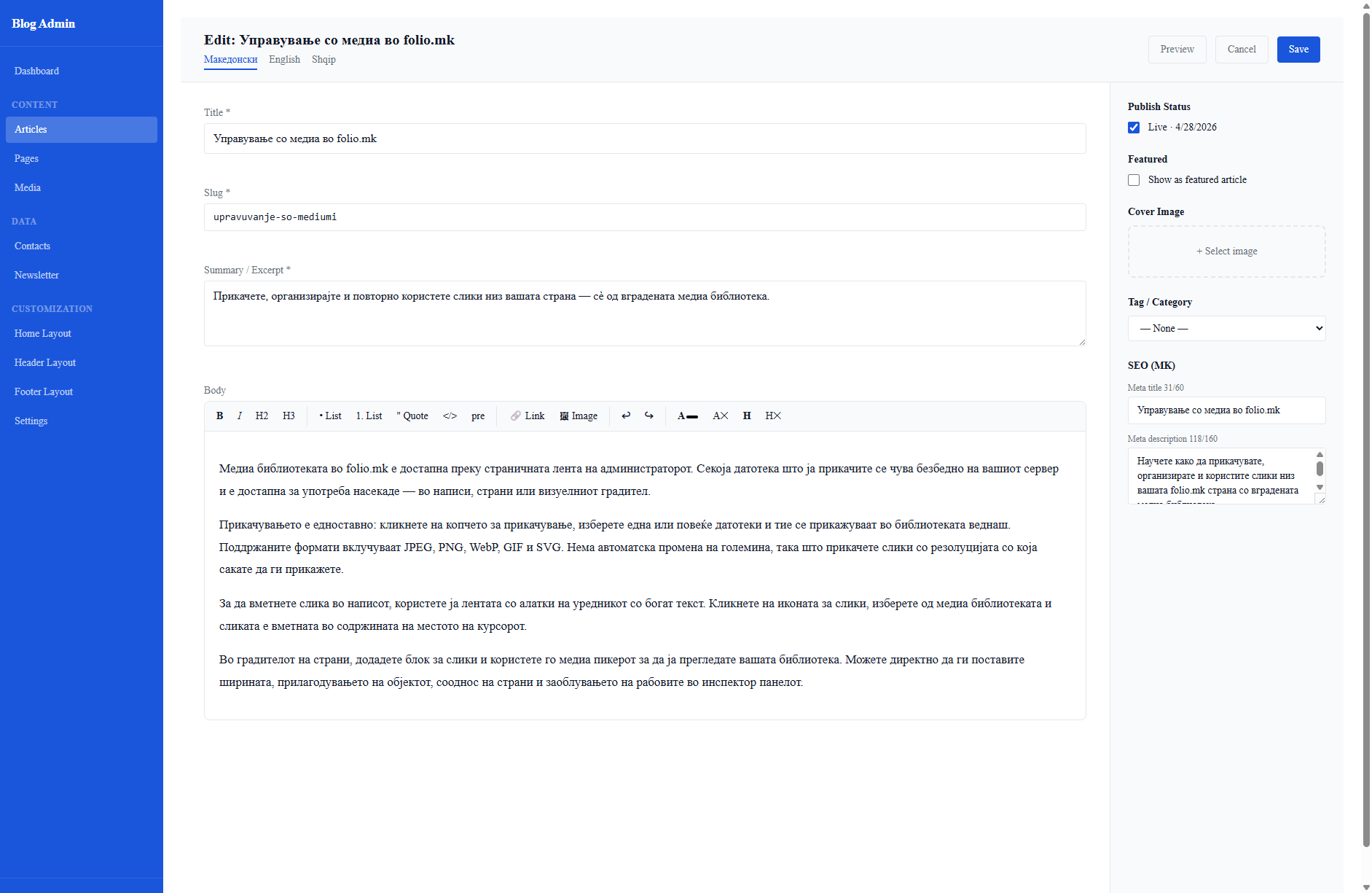
Articles are the core content type in folio.mk. Each article can have translations in all your active languages. The editor is accessible from Articles → Edit or the + New button.
The multilingual editor
At the top of every article editor you will find language tabs — one for each language enabled in Settings. All fields (Title, Slug, Excerpt, Body, Tag, Meta title, Meta description) are language-specific. Switching tabs switches the content, so you write distinct content for each language independently.
The rich text body editor
The body field uses a WYSIWYG rich text editor with the following toolbar buttons:
B / I — bold and italic.
H2 / H3 — heading levels 2 and 3.
• List / 1 List — unordered and ordered lists.
" Quote — blockquote.
<> / pre — inline code and preformatted code block.
Link — insert or edit a hyperlink.
Image — open the media picker to insert an image from your library.
↩ / ↪ — undo and redo.
A— / A× — remove inline formatting / clear all formatting.
H / H× — insert a horizontal rule / remove it.
The editor outputs clean HTML. You can switch to the raw HTML view using the <> button to paste or edit markup directly.
Right side-panel fields
Publish Status — toggle between Live (visible on site) and Draft (hidden). The Published At date controls ordering in article feeds; you can back-date or future-date it.
Featured — tick Show as featured article to promote the article to the Featured Articles template block on the home page.
Cover Image — click + Select image to open the media picker. The cover is used in article card thumbnails, the article page header, and the Open Graph social preview image.
Tag / Category — a single tag used for filtering and display on the articles listing page.
SEO fields — per-language meta title (max 60 chars) and meta description (max 160 chars) for search engine snippets.
Saving and rebuilding
Click Save to save the article and trigger an automatic static site rebuild. Use Preview to open the live article page in a new tab to verify the rendered output.